
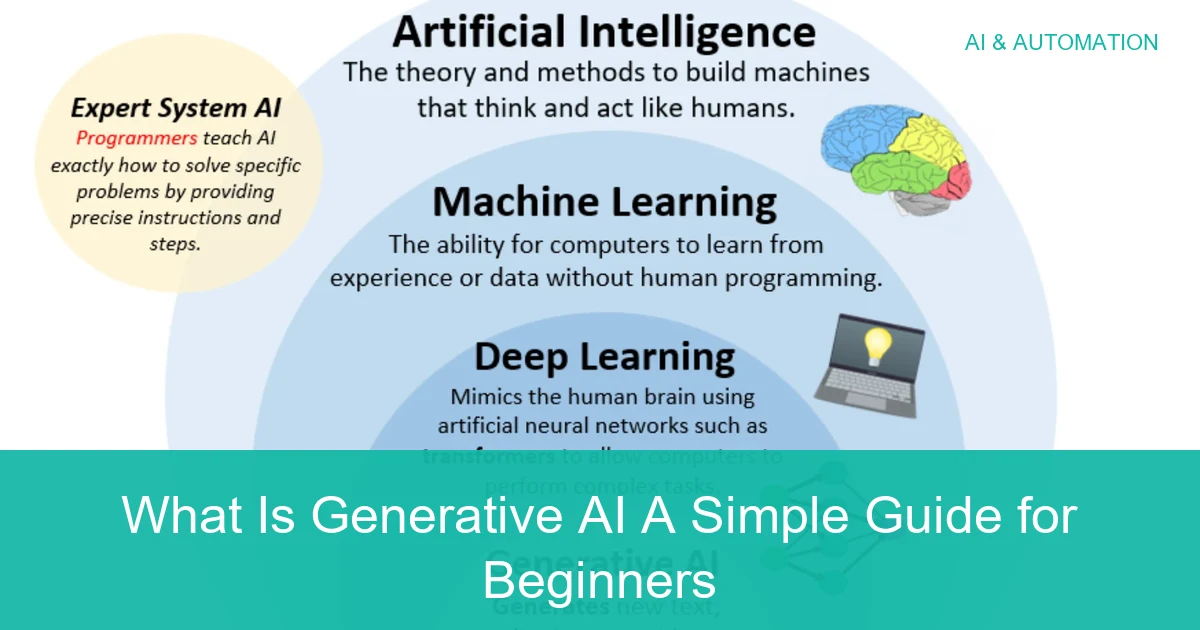
What Is Generative AI A Simple Guide for Beginners
Generative AI is a type of artificial intelligence that creates new content such as text, images, audio, video, and code. It is useful for drafting and brainstorming, but it still needs human review because it can make mistakes.
Generative AI is a type of artificial intelligence that creates new content instead of only sorting, analyzing, or classifying existing data. In simple terms, it can write text, generate images, produce audio, make video, and even help with code.
If you have ever used a chatbot, a writing assistant, or an image generator, you have already seen generative AI in action. The key is understanding what it can do well, where it falls short, and how to use it safely and effectively.
- Simple definition: Generative AI creates new content from learned patterns.
- Main uses: Writing, images, audio, video, and code.
- Big benefit: It saves time and helps people start faster.
- Main risk: It can sound right while still being wrong.
- Best practice: Use it as a helper, then verify important results.
What Is Generative AI and Why It Matters in 2026
So, what is generative AI? It is AI designed to produce original-looking outputs based on patterns it learned from training data. Instead of simply finding an answer in a database, it predicts what content should come next.
That matters because generative AI is no longer a niche experiment. It is built into everyday tools for writing, design, customer service, coding, and productivity, which means beginners and businesses are encountering it more often.
In 2026, the biggest reason it matters is practical value. It can save time, speed up first drafts, and make advanced digital tools more accessible to non-experts. But it also introduces new risks, especially when people assume it is always accurate.
How Generative AI Works in Simple Terms
You do not need a technical background to understand the basics. A generative AI model is trained on large amounts of data so it can learn patterns in language, images, code, or other content types.
When you ask it for something, it uses those patterns to generate a response that fits your request. The result may look creative, but it is really based on probability and pattern matching.
From Training Data to New Content
Training data is the material the model learns from. For text models, that can include books, articles, websites, or other text sources. For image models, it may include large image collections and captions.
The model studies relationships between words, shapes, styles, and structures. Later, when you give it a prompt, it combines what it learned into a new output that is similar in style or structure, but not copied word for word in normal use.
Different models are trained on different data and updated on different schedules, so quality and freshness can vary a lot from one tool to another.
Prompts, Models, and Outputs
A prompt is the instruction you give the AI. The model is the system doing the generation, and the output is the result you receive. Better prompts usually produce better results, but even a strong prompt cannot guarantee accuracy.
For example, asking for “a friendly 100-word product description for a beginner audience” is more useful than saying “write about this.” Clear prompts help the model understand tone, length, and purpose.
State the task, audience, tone, and format as specifically as you can.
Check facts, wording, and whether the result actually matches your goal.
Use the AI draft as a starting point, then improve it with human judgment.
Common Types of Generative AI You Use Every Day
Generative AI shows up in many forms, often without people realizing it. Some tools are built for conversation, while others create visuals, sound, or code.
This is why the term can feel broad. The common thread is that the system generates something new rather than just retrieving information.
Text Generators for Writing and Chat
Text generators are the most familiar type. They can draft emails, summarize articles, answer questions, translate text, and help brainstorm ideas.
Chatbots are a popular example because they respond in a conversational way. They are helpful for first drafts and quick explanations, but they can still make mistakes or sound confident when wrong.
Image, Audio, Video, and Code Generation
Image generators create pictures from text prompts. Audio tools can generate voice, music, or sound effects. Video tools can assist with clips, storyboards, or motion concepts, though results vary widely by platform. [Source: Wikipedia]
Code generators help write or explain software code. They can be useful for developers and beginners alike, but they should never be treated as a replacement for testing and review.
Some generative AI tools can combine multiple content types in one workflow, such as drafting text, suggesting images, and summarizing feedback in the same session.
Real-World Use Cases Across Work and Daily Life
Generative AI is useful because it fits into everyday tasks, not just technical projects. Many people use it to save time, reduce repetitive work, and get unstuck when they are facing a blank page.
If you also work with digital workflows, you may notice how AI often supports broader productivity habits, much like the planning advice in our guide to build a home office under 500 or our article on improve video call quality.
Marketing, Customer Support, and Productivity
In marketing, generative AI can draft ad copy, social captions, product descriptions, and campaign ideas. In customer support, it can help suggest replies or organize common questions.
For productivity, it can summarize long notes, rewrite content in a different tone, or turn rough thoughts into a structured outline. The best use is often as a helper, not a final decision-maker.
Education, Design, and Software Development
Students may use generative AI to explain concepts, quiz themselves, or create study outlines. Designers may use it for brainstorming visual directions, while developers may use it to speed up coding tasks or understand unfamiliar functions.
That said, schoolwork, branding, and software all need human oversight. A generated answer may sound polished without actually being correct, original, or appropriate for the situation.
Benefits of Generative AI for Beginners and Businesses
For many users, the biggest appeal is simple: it helps get work done faster. It can also lower the barrier to entry for people who do not have advanced writing, design, or coding skills.
- Speeds up first drafts
- Supports brainstorming
- Helps non-experts create content
- Can improve consistency across tasks
- Can produce incorrect answers
- Needs human review
- May reflect bias in training data
- Can create privacy concerns
Speed, Creativity, and Cost Savings
Generative AI can reduce the time spent on repetitive work, especially for drafts, summaries, and variations of the same idea. It can also help people explore more creative options than they might produce alone.
For businesses, that can mean lower labor time on routine content tasks. For beginners, it can mean a less intimidating way to start a project and then improve it step by step.
Personalization and Scale
One of the strongest advantages is personalization. AI can tailor tone, length, difficulty level, or format to different audiences without starting from scratch each time.
That also makes it useful at scale. A team can create many variations of a message, lesson, or support response while keeping a consistent structure.
Use generative AI for the first 70% of a task, then spend your time on the final 30%: fact-checking, editing, and adding human context.
Common Mistakes and Risks to Watch For
Generative AI is powerful, but it is not automatically reliable. The most common mistake is trusting the output too quickly because it sounds polished.
That is especially risky when the topic involves money, health, legal issues, safety, or anything where accuracy matters more than speed.
Hallucinations, Bias, and Outdated Information
Hallucinations are AI outputs that sound plausible but are wrong or made up. Bias can appear when the model reflects uneven or unbalanced training data. Outdated information is another issue, especially if the model is not connected to current sources.
Do not use an AI answer as proof that something is true. If the result affects a decision, verify it with trusted sources or a qualified person. [Source: CDC]
This is why careful review matters. A model may be useful for drafting, but it should not be treated as a final authority.
Privacy, Copyright, and Overreliance
Be careful about entering sensitive information into AI tools, especially if you are unsure how the data is stored or used. Privacy policies vary by product, account type, and region, so it is worth checking the details first.
Copyright and originality can also be complicated. AI-generated content may resemble existing work more closely than expected, and the rules around use can vary by jurisdiction and platform.
For legal, medical, financial, or compliance-related content, ask a qualified professional to review the final result before you rely on it.
When to Use Generative AI vs When to Seek Expert Help
A practical way to think about generative AI is this: use it when speed, brainstorming, or drafting matters most, and bring in an expert when the stakes are high.
If you are unsure whether a task is simple or sensitive, it is usually safer to treat AI as a helper rather than a decision-maker.
Simple Tasks You Can Handle Yourself
Generative AI is often a good fit for low-risk tasks such as rewriting a paragraph, summarizing notes, brainstorming titles, creating practice questions, or outlining a project.
These are situations where a rough draft is enough to get started. You can then revise the result based on your own judgment and goals.
- Use AI for drafts, not final truth
- Check tone and clarity before publishing
- Verify names, dates, and facts
- Rewrite anything that sounds generic
High-Stakes Work That Needs Human Review
Anything involving safety, legal exposure, financial loss, medical decisions, or major business commitments should be reviewed by a person with the right expertise. AI can support the process, but it should not be the final authority.
This is also true when a mistake could affect a contract, a warranty, a policy decision, or a customer relationship. In those cases, expert review is not optional.
- Brainstorming ideas
- Drafting routine content
- Summarizing information
- Exploring variations
- Medical or legal advice
- Financial decisions
- Private or sensitive data
- Anything requiring exact accuracy
Final Recap: The Simple Answer to What Is Generative AI
Generative AI is technology that creates new content from patterns it learned during training. It can be incredibly useful for writing, design, coding, and everyday productivity, but it still needs human judgment to stay accurate and safe.
The simplest way to use it is as a smart assistant: let it help you start faster, then check, edit, and decide for yourself. That balance is what makes generative AI genuinely useful for beginners and businesses alike.
Frequently Asked Questions
Generative AI is artificial intelligence that creates new content like text, images, audio, video, or code. It learns patterns from training data and uses them to produce fresh outputs.
Regular AI often classifies, predicts, or recommends based on existing data. Generative AI goes a step further by creating something new, such as a draft, image, or code snippet.
Examples include chatbots, writing assistants, image generators, voice tools, and coding helpers. The exact features vary by product and version.
Yes. It can produce hallucinations, outdated information, biased results, or content that sounds correct but is not. Always review important outputs.
It can be safe for low-risk tasks if you avoid sharing sensitive information and verify important results. For legal, medical, financial, or privacy-sensitive work, human review is important.
It is more likely to change how many jobs are done than replace every role entirely. In most cases, it works best as a tool that supports human judgment and creativity.
