
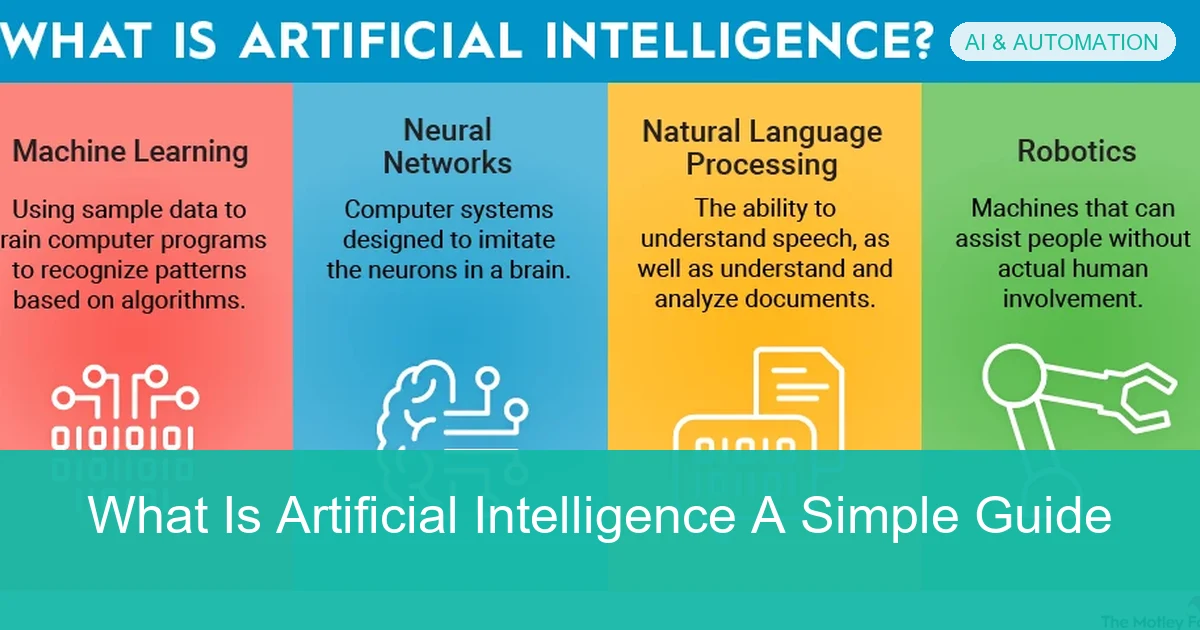
What Is Artificial Intelligence A Simple Guide
Artificial intelligence is software that can perform tasks usually associated with human intelligence, such as recognizing patterns, generating content, and making predictions. Most AI today is narrow and useful for specific jobs, but it still needs human review because it can make mistakes.
Artificial intelligence, or AI, is a broad term for computer systems that can perform tasks that usually require human intelligence. In simple terms, AI helps software recognize patterns, make predictions, generate text or images, and support decisions. If you have ever used search suggestions, a map app, or a chatbot, you have already interacted with AI in some form.
For a practical overview of how AI fits into everyday tools, it helps to think of it as a set of technologies rather than one single machine. That matters because the answer to what is artificial intelligence depends on the context: some AI systems are very narrow and useful, while others are still experimental. For readers comparing tools or planning workflows, our guide to tiny home office ideas guide shows how digital tools can support everyday productivity choices.
- Definition: AI is software that imitates some human-like tasks.
- Everyday use: It powers search, recommendations, maps, and assistants.
- Main types: Most current AI is narrow AI, machine learning, or generative AI.
- Best use: AI works well for speed, drafts, and pattern-finding.
- Important limit: It can be wrong, biased, or sensitive to bad data.
What Is Artificial Intelligence? A Clear Definition for 2026
Artificial intelligence is technology designed to carry out tasks that normally need human judgment. Those tasks can include recognizing speech, classifying images, writing text, recommending products, detecting fraud, or helping a customer service team answer questions faster.
The definition is intentionally broad because AI includes several methods. Some systems rely on rules written by humans, while others learn from examples and improve their output over time. In business settings, AI is often used to speed up repetitive work and make large amounts of data easier to understand.
How AI differs from normal software and automation
Normal software follows fixed instructions. If you press a button, the program does the same thing every time unless a developer changes the code. Automation also follows predefined steps, such as sending an email after a form submission.
AI is different because it can make probabilistic judgments. Instead of only following a strict rule, it may estimate the most likely answer based on patterns in data. That is why AI can feel flexible, but it also means results can vary and may not always be correct.
AI does not replace all automation. Many useful products combine both: automation handles the workflow, and AI handles the parts that require prediction, classification, or language generation.
Why the term “artificial intelligence” can mean several technologies
People use the phrase AI to describe many different tools, from spam filters to chatbots. That can be confusing because not every tool labeled AI works the same way or has the same level of capability.
In practice, the term may refer to machine learning, deep learning, natural language processing, computer vision, or generative AI. When evaluating a product, it helps to ask what kind of AI it uses and what problem it is actually solving.
How Artificial Intelligence Works in Everyday Life
Most people meet AI through apps they already use, often without noticing it. The system may be ranking search results, filtering messages, suggesting a route, or deciding which video or product to show next.
This hidden layer matters because AI is often less visible than the interface. You may not see a robot or a “smart” dashboard, but the app may still be using models behind the scenes to make decisions faster than a human could.
Examples people use daily: search, recommendations, voice assistants, and maps
Search engines use AI to interpret your query and return the most relevant results. Recommendation systems suggest movies, songs, products, or articles based on patterns in your activity and similar users’ behavior.
Voice assistants use speech recognition and language processing to understand spoken commands. Map apps use AI to estimate traffic, suggest routes, and update arrival times based on changing conditions.
Many recommendation systems are not trying to find the one “best” item. They are trying to predict what you are most likely to click, watch, or buy next.
Where AI is often hidden inside apps and business tools
AI is common in email spam filters, document scanners, fraud detection tools, and customer support chat systems. It is also used in writing assistants, scheduling tools, CRM platforms, and analytics dashboards.
For teams, this hidden AI can save time on repetitive work. But it also means you should review outputs carefully, especially when the tool affects customers, finances, or legal records.
The Main Types of AI You Should Know
Understanding the main types of AI makes it easier to choose the right tool. The labels can sound technical, but the basic ideas are straightforward once you separate them.
- Learning the basics of AI
- Comparing tools by capability
- Setting realistic expectations
- Assuming all AI works the same way
- Expecting human-like understanding
- Using the wrong tool for the job
Narrow AI vs. general AI: what exists today and what does not
Narrow AI is designed for one task or a limited set of tasks. Examples include spam detection, image tagging, translation, and recommendation engines. Most AI you use today falls into this category.
General AI would be able to handle many different tasks at a human level across domains. That kind of system is not something everyday users can rely on today, and it should not be assumed to exist in common products.
Machine learning, deep learning, and generative AI explained simply
Machine learning is a method where systems learn patterns from data instead of being told every rule manually. Deep learning is a more advanced form of machine learning that uses layered neural networks and is often strong at image, audio, and language tasks.
Generative AI is a category of tools that create new content, such as text, images, code, or audio. These tools can be impressive, but they still depend on prompts, training data, and system design, so the output needs review.
Do not assume a generative AI answer is automatically true. It can sound confident while still being incomplete, outdated, or wrong. [Source: EPA]
Real-World Uses of AI Across Industries
AI is now used in many industries because it can process information quickly and at scale. The exact use case depends on the organization, the quality of its data, and how much human oversight is built into the process.
AI in customer service, marketing, healthcare, finance, and manufacturing
In customer service, AI can route tickets, suggest replies, and answer common questions. In marketing, it can help segment audiences, personalize messages, and generate first drafts of content.
In healthcare, AI may support image analysis, scheduling, or administrative work, though clinical decisions require careful professional review. In finance, it can help detect unusual activity and support risk analysis. In manufacturing, AI can help monitor equipment, inspect products, and reduce downtime.
For businesses building a practical workflow, it can help to pair AI with a clear process. If you are organizing a small workspace or team setup, our article on how to build a home office for under 500 is a useful example of planning with constraints in mind.
How businesses use AI for speed, prediction, and personalization
Speed is one of AI’s biggest advantages. It can summarize documents, sort requests, and produce drafts much faster than manual work.
Prediction is another major use. Businesses use AI to estimate demand, flag likely churn, identify trends, or detect anomalies. Personalization helps companies tailor recommendations and messages to individual users, which can improve relevance when done responsibly.
Benefits of AI for Users and Organizations
AI is popular because it can reduce repetitive work and support better decisions. The best results usually come when AI is used as an assistant, not as a replacement for judgment.
Saving time, reducing manual work, and improving decision-making
For users, AI can save time by drafting text, summarizing long material, or helping find information faster. For teams, it can reduce manual sorting, data entry, and routine analysis.
AI can also improve decision-making when it highlights patterns humans might miss. That is especially useful when the data set is large, the task is repetitive, or the decision needs to happen quickly.
Use AI first for low-risk drafts, summaries, and pattern-finding. Keep a human in the loop for anything customer-facing, financial, legal, or safety-related.
Common business outcomes: efficiency, scalability, and better customer experience
Efficiency comes from doing more work with less time spent on routine tasks. Scalability comes from handling more requests without increasing headcount at the same pace.
Customer experience can improve when AI helps people get faster answers, more relevant recommendations, and smoother service. Still, the experience only improves if the AI is accurate and the workflow is well designed.
Common Misunderstandings and Mistakes About AI
AI is powerful, but it is often oversold. A balanced understanding helps people avoid disappointment, bad decisions, and unnecessary risk.
Why AI is not always accurate, neutral, or fully autonomous
AI systems can make mistakes because they learn from data that may be incomplete, outdated, or biased. They can also produce outputs that sound polished even when the underlying reasoning is weak.
AI is not automatically neutral either. If the training data reflects human bias, the model may reproduce those patterns. And most AI tools are not fully autonomous in the way people imagine; they still depend on design choices, prompts, permissions, and oversight.
Overestimating AI capabilities and underestimating human oversight
One common mistake is assuming AI can handle a task end to end without review. Another is ignoring how much setup, testing, and monitoring is needed for a reliable result.
Human oversight remains important for quality control, compliance, and accountability. AI can assist with decisions, but people should still be responsible for checking the output and deciding when it is safe to use.
If an AI tool will affect medical, legal, financial, or security decisions, ask a qualified professional before relying on it. In these areas, a wrong answer can create real harm.
When You Should Use AI Tools and When to Seek Expert Help
AI is a good fit when the task is repetitive, low-risk, and easy to review. It is less suitable when the stakes are high, the data is sensitive, or the system must work reliably under strict rules.
Good use cases for beginners, teams, and small businesses
Beginners can use AI for brainstorming, writing rough drafts, summarizing notes, and organizing information. Teams can use it to speed up internal workflows, improve search, and support customer service. [Source: WebMD]
Small businesses often benefit from AI when they need help with content drafts, lead sorting, scheduling, or basic analytics. The key is to start with a narrow use case and measure whether the tool actually saves time or improves quality.
- Choose one simple task first
- Review outputs before sharing them
- Keep sensitive data out unless the tool is approved
- Measure time saved or quality improved
When legal, technical, security, or strategy support becomes necessary
Seek expert help when AI touches contracts, compliance, privacy, system integrations, or customer data. You should also ask for help if the tool needs to connect to internal systems or if the implementation may affect security.
Strategy support becomes useful when you are deciding whether AI should be part of a core business process. A professional can help weigh cost, risk, governance, and long-term fit instead of focusing only on the tool’s features.
AI Costs, Risks, and Choosing the Right Solution
AI tools vary widely in price and capability. Some are free or included in existing software, while others charge for higher usage, team access, data controls, or advanced features.
Free tools vs. paid platforms: what affects pricing in 2026
Free tools often limit usage, features, or support. Paid platforms may offer better reliability, stronger privacy controls, team administration, or access to more advanced models.
Pricing can depend on message volume, number of seats, API usage, storage, integrations, and enterprise support. Because these details change by provider and plan, it is best to compare current pricing directly before committing.
How to compare AI tools based on accuracy, privacy, and support
Start by testing whether the tool gives useful answers for your actual task. Accuracy matters more than flashy features, especially if the output will be reused in public-facing work.
Privacy and support are just as important. Check whether the vendor explains how data is used, whether you can control retention, and whether support is available if something goes wrong.
Key risks: data privacy, bias, compliance, and vendor lock-in
Data privacy is a major concern because some tools may store prompts, files, or conversation history. Bias can affect recommendations or decisions in ways that are hard to notice at first.
Compliance matters when a tool handles regulated or sensitive information. Vendor lock-in is another risk: if your workflow depends on one platform, switching later may be expensive or disruptive.
- Fast testing and easy access
- Useful for low-risk tasks
- Can reduce manual effort
- Quality varies by tool and prompt
- Privacy and compliance may be unclear
- Costs can grow with usage
Final Recap: What Artificial Intelligence Means Today
Artificial intelligence is software that performs tasks associated with human intelligence, such as prediction, classification, language generation, and pattern recognition. Today’s AI is mostly narrow, meaning it is good at specific tasks rather than truly human-like general thinking.
Simple summary of the definition, uses, and limits of AI
AI is useful because it can save time, improve scale, and support better decisions. It shows up in everyday apps, business tools, and industry systems, often in ways that are not obvious to the user.
At the same time, AI has real limits. It can be wrong, biased, or overconfident, so it should be used with review and clear expectations.
What readers should remember before trying AI tools
Before trying any AI tool, decide what problem you want to solve, how much risk is involved, and who will review the output. That simple habit prevents many common mistakes.
If you remember one thing from this guide, let it be this: AI is a useful assistant, not a replacement for judgment. The best results come from choosing the right tool, using it carefully, and knowing when to ask an expert.
Frequently Asked Questions
Artificial intelligence is software that can do tasks usually linked to human thinking, such as recognizing patterns, understanding language, or making predictions. It is used in apps, business tools, and everyday devices.
Automation follows fixed steps that humans define ahead of time. AI can make probabilistic decisions or generate outputs based on data, so it is more flexible but less predictable.
The main types people talk about are narrow AI, machine learning, deep learning, and generative AI. Most tools available today are narrow AI built for specific tasks.
No, AI can make mistakes and sometimes sounds more confident than it should. It should be reviewed carefully, especially for important work.
People use AI in search engines, recommendations, voice assistants, maps, spam filters, and many business apps. It often works behind the scenes without being obvious.
Ask a professional when AI affects legal, medical, financial, security, or compliance-related decisions. Expert help is also useful when you need privacy, integrations, or a long-term strategy.
