
Lighting for Home Office: The Complete Setup Guide
A well-designed workspace needs more than a good desk and comfortable chair. Lighting for home office setups can make a major difference in how clearly you see your work, how your desk looks, and how comfortable the room feels throughout the day.
Harsh ceiling lights, dark desk areas, screen reflections, distracting shadows, and poor video-call lighting can all make a workspace feel less polished. The solution is usually not one extremely bright lamp. Instead, the best home office lighting setup combines different types of light and places each source where it works best.
Whether you work remotely, freelance, study, create content, game, or spend hours at a computer, this guide will help you build a practical and attractive lighting setup.
Why Lighting Matters in a Home Office

Good lighting helps make a workspace easier to use. It can improve visibility when reading or writing, make your desk feel more inviting, and create a cleaner appearance on video calls.
A thoughtful lighting setup can help with:
- Better visibility around your workspace
- More comfortable computer and desk work
- Reduced distracting reflections
- A more attractive desk setup
- Better-looking video calls
- Easier adjustment between daytime and nighttime
- A more polished overall office environment
The goal is balance. Your desk should not be dramatically brighter or darker than the surrounding room, and your computer display should not compete with an extremely bright light source.
The Three Main Types of Home Office Lighting

A good home office usually combines ambient, task, and accent lighting. Each type serves a different purpose.
Ambient Lighting
Ambient lighting provides general illumination for the entire room.
Common examples include:
- Ceiling fixtures
- Floor lamps
- Wall lights
- Diffused room lights
- Bright smart bulbs
Ambient light prevents the workspace from feeling like a bright island surrounded by a dark room.
If your office already receives plenty of natural light during the day, you may not need powerful artificial ambient lighting. At night, however, a good room light becomes more important.
Task Lighting
Task lighting provides focused illumination where you perform specific activities.
A desk lamp is one of the simplest examples. Adjustable task lights are especially useful because you can direct the light toward a notebook, keyboard, craft project, or other work area.
Look for a desk lamp with:
- Adjustable direction
- Adjustable brightness
- A stable base or clamp
- A suitable size for your desk
- Comfortable light output
Task lighting should complement your screen rather than create reflections on it.
Accent Lighting
Accent lighting is primarily used to improve atmosphere and visual interest.
Popular options include:
- LED strips
- Shelf lighting
- Wall lights
- Under-shelf lighting
- Monitor backlighting
- Smart lighting
Accent lighting can be especially effective in modern workspaces. For example, a subtle LED strip behind a desk can add depth without taking up desk space.
How to Choose the Best Lighting for a Home Office
There is no single lamp that works perfectly for every office. Consider the room, desk size, natural light, type of work, and your personal preferences.
Brightness
Brightness is an important specification when shopping for lighting. Manufacturers commonly describe light output in lumens.
A larger room may require more overall illumination than a small workspace, while a focused task lamp may need less total output because it directs light toward a specific area.
Instead of looking for one universal brightness number, consider how the light will be used and whether its brightness can be adjusted.
Color Temperature
Color temperature affects the appearance and mood of your workspace.
In simple terms:
- Warm light feels softer and more relaxing.
- Neutral light provides a balanced, natural-looking appearance.
- Cool light appears whiter or slightly bluish.
Warm lighting can work well for evening atmosphere and accent lighting. Neutral lighting is a versatile choice for many workspaces, while cooler light may appeal to people who prefer a crisp, bright-looking office.
If possible, choose adjustable lighting so you can change the setting as your needs change.
Adjustable Brightness
A dimmable desk lamp or smart light gives you more control than a fixed-output lamp.
You might prefer brighter lighting while reading or organizing paperwork and a softer setting when watching a presentation or relaxing at your desk.
Adjustable brightness also makes it easier to balance artificial lighting with changing daylight.
Adjustable Direction
An adjustable lamp is useful because your lighting needs can change throughout the day.
A flexible arm or rotating lamp head lets you direct light toward your keyboard, notebook, or other work area without illuminating your monitor directly.
Glare Control
Glare is one of the most common home office lighting problems.
A bright light positioned incorrectly can reflect from a monitor and make the screen harder to view. To reduce distracting reflections:
- Avoid placing bright lights directly in front of the screen.
- Use diffused light where possible.
- Position desk lamps to the side.
- Adjust the lamp angle rather than pointing it straight at the monitor.
- Consider a monitor light bar for focused desk illumination.
Good lighting should illuminate your workspace without becoming a distraction.
Best Lighting Setup for a Computer Desk
A practical computer desk setup can use four layers:
- Main room light — Provides general illumination.
- Desk/task lamp — Adds focused light where you work.
- Monitor light or bias light — Adds controlled illumination around the display area.
- Optional accent lighting — Improves atmosphere and visual depth.
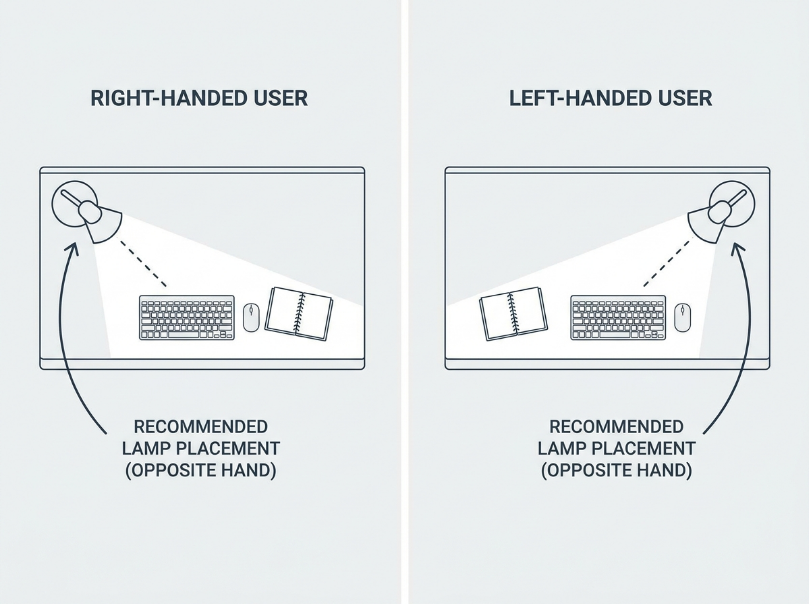
For a right-handed person, placing the desk lamp toward the left side can help reduce shadows when writing. Left-handed users may prefer the opposite arrangement.
However, your desk layout matters more than following a rigid rule. Position the lamp where it illuminates your work without creating reflections or blocking your screen.
How to Position Lighting for a Home Office
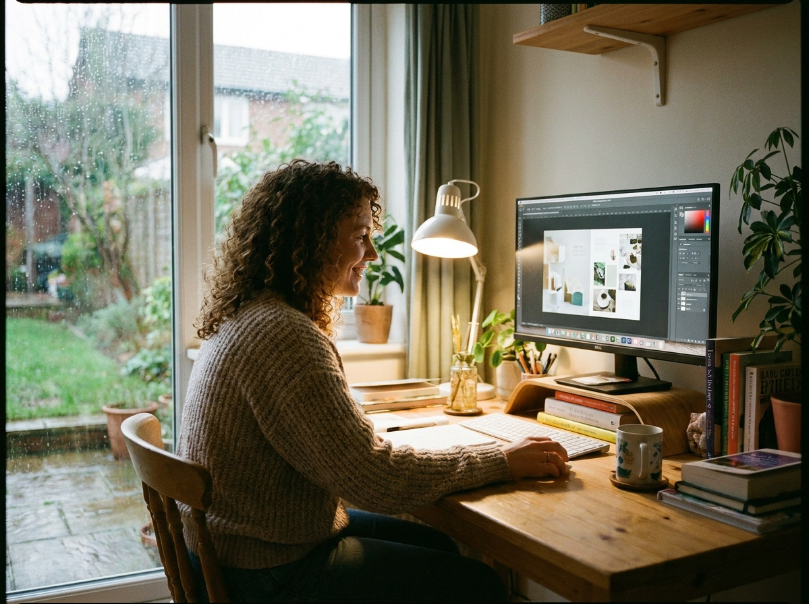
Correct placement can make even an inexpensive lighting setup work much better.
Lighting From the Side
Side lighting is often useful for desk work because it can illuminate your workspace without shining directly into your monitor.
Try placing your desk lamp slightly to the side and in front of your working position.
Lighting Behind the Monitor
A soft light behind the monitor can create subtle background illumination. This can also add visual depth to a desk setup.
Avoid using an extremely bright light directly behind the display because it can become distracting.
Overhead Lighting
Overhead lighting should provide general room illumination rather than doing all the work.
If the ceiling light creates strong shadows or feels harsh, consider using a diffuser, softer bulb, or additional floor or desk lighting.
Desk Lamp Positioning
A desk lamp should illuminate the work surface without shining directly into your eyes.
Experiment with:
- Lamp height
- Lamp angle
- Distance from the monitor
- Side placement
- Brightness level
Small adjustments can make a surprisingly large difference.
Window Positioning
Natural light can be excellent for a home office, but direct sunlight can create screen reflections.
If possible, position your desk so the window is to the side rather than directly behind or directly in front of your monitor.
Do This vs. Avoid This
| Do This | Avoid This |
|---|---|
| Place the desk lamp to the side | Point a bright lamp directly at the screen |
| Use diffused light | Use harsh bare light sources |
| Balance room and desk lighting | Keep the desk bright while the room is very dark |
| Adjust lighting during the day | Use the same brightness in every situation |
| Keep strong windows to the side | Put a bright window directly behind your head |
Best Lighting for Home Office Video Calls

Good video-call lighting starts with one simple principle: your face should receive useful light from the front or slightly to the side.
A bright window directly behind you can turn your face into a dark silhouette. Instead, try positioning your desk so natural light comes from in front of you or from the side.
For a simple video-call setup:
- Place a soft light in front of you.
- Keep very bright windows from being directly behind you.
- Use adjustable brightness.
- Avoid extremely harsh light from directly above.
- Balance natural and artificial light.
- Check for strong shadows before an important call.
A dedicated video light can be useful if you regularly attend meetings, record videos, stream, or create online content.
The same basic approach works for video meetings across platforms such as Zoom, Google Meet, Microsoft Teams, and similar services.
15 Home Office Lighting Ideas
If you’re upgrading your workspace, consider these practical home office lighting ideas.
1. Adjustable Desk Lamp
A flexible desk lamp is one of the easiest upgrades. Choose one that lets you adjust both direction and brightness.
2. Monitor Light Bar
A monitor light bar sits above your display and directs light toward the desk. It can be useful when you want task lighting without placing another lamp on the desk.
3. LED Desk Lamp
LED desk lamps are available in many compact designs and often offer brightness or color-temperature controls.
4. Wall-Mounted Light
Wall-mounted lighting can save valuable desk space. It works particularly well in compact offices.
5. Floor Lamp
A floor lamp can provide ambient lighting without occupying your desk surface.
6. Smart Bulb
A smart bulb gives you convenient control over brightness and, depending on the model, color temperature or color scenes.
7. LED Strip Behind the Desk
A hidden LED strip can create subtle background illumination and add depth to a modern workspace.
8. Shelf Lighting
If your office has open shelves, small lights can highlight books, plants, collectibles, or decorative objects.
9. Under-Shelf Lighting
Under-shelf lighting is particularly useful when you have limited desk space. It provides focused illumination while keeping the desktop clean.
10. Window + Desk Lamp Combination
During the day, use natural light as your main source and supplement it with a desk lamp when needed.
11. Minimalist Desk Lamp
A simple lamp with a clean shape can provide useful lighting without making a small desk feel crowded.
12. Dual-Monitor Lighting Setup
People using two monitors can benefit from carefully positioned ambient or monitor lighting that covers the wider workspace.
13. Corner Floor Lamp
A floor lamp placed in an unused corner can improve room illumination without taking up valuable working space.
14. Diffused Overhead Lighting
If your ceiling light is harsh, a more diffused fixture can create softer overall illumination.
15. Video-Call Key Light
A dedicated adjustable light can improve your appearance during meetings, presentations, recordings, and livestreams.
Lighting Ideas for Small Home Offices
Small workspaces require careful use of every available surface.
Small home office lighting works best when lighting provides maximum usefulness without adding clutter.
Consider:
- Wall-mounted lights
- Monitor light bars
- Clamp lamps
- Slim desk lamps
- Ceiling lighting
- Under-shelf lighting
- Smart bulbs
A monitor light bar is particularly useful when your desk is too small for a traditional lamp. A clamp lamp can also attach to the side or rear of a desk and free up surface area.
For a tiny office, layered lighting does not mean adding many large fixtures. It means using a few compact sources for different purposes.
Modern Home Office Lighting Ideas
Modern lighting can make a workspace feel more polished without sacrificing functionality.
Consider a combination of:
- Minimalist LED lamps
- Black or white modern desk lamps
- Smart lighting
- Hidden LED strips
- Monitor backlighting
- Architectural-style fixtures
The key is restraint. Instead of filling the room with multiple bright colors, choose a simple lighting scheme that supports the desk and surrounding décor.
For example, a neutral desk lamp combined with subtle backlighting can create a modern look while keeping the primary work area properly illuminated.
Common Home Office Lighting Mistakes
1. Relying Only on Ceiling Lighting
Problem: The desk may still feel dark or create shadows.
Solution: Add dedicated task lighting.
2. Placing a Lamp Directly Behind the Monitor
Problem: A bright source can become distracting or create unwanted contrast.
Solution: Use controlled background lighting and keep the brightness moderate.
3. Creating Screen Reflections
Problem: Light reflects from the display.
Solution: Move the light to the side or adjust its angle.
4. Using Extremely Harsh Light
Problem: The room can feel uncomfortable and visually aggressive.
Solution: Try diffused lighting or lower the brightness.
5. Making the Desk Too Dark
Problem: Your work surface may not have enough illumination.
Solution: Add a task light or monitor light.
6. Placing a Bright Window Directly Behind You
Problem: Your face can appear dark during video calls.
Solution: Position the window in front of you or to the side when practical.
7. Ignoring Video-Call Lighting
Problem: A well-designed office can still look poorly lit on camera.
Solution: Add a soft front-facing light and check your camera before important meetings.
8. Using Too Many Competing Light Colors
Problem: Warm, cool, and colored lights can make the room feel visually inconsistent.
Solution: Keep your main lighting coordinated and reserve stronger color effects for accent lighting.
How to Build a Home Office Lighting Setup on a Budget
You do not need an expensive lighting system to create a useful workspace.
Budget Setup
Start with:
- Existing room lighting
- One adjustable desk lamp
- Natural window light
Focus on positioning before buying additional equipment.
Mid-Range Setup
Add:
- A better adjustable desk lamp
- A monitor light or additional task light
- Improved ambient lighting
- Optional accent lighting
This creates a more layered and flexible workspace.
Premium Setup
A more advanced setup might include:
- Multiple adjustable lights
- Smart bulbs
- Smart lamps
- Monitor lighting
- Dedicated video lighting
- Hidden LED accent lighting
The goal should still be control and balance rather than simply adding more lights.
Smart Lighting for a Home Office
Smart lighting can make a home office more flexible.
Depending on the system, smart bulbs and lamps may allow you to:
- Adjust brightness
- Schedule lighting
- Control lights through an app
- Use voice controls
- Create different lighting scenes
- Change settings throughout the day
For example, you might use brighter neutral lighting while working and a warmer, softer setting later in the evening.
Smart lighting is especially appealing when several lights need to be controlled together. However, smart features are optional. A well-positioned conventional lamp can still provide excellent workspace lighting.
Home Office Lighting Checklist
Before buying or installing lights, check your workspace against this list:
- Enough overall room illumination
- Dedicated task lighting
- Adjustable brightness
- Adjustable direction
- Reduced screen glare
- Comfortable color temperature
- Good video-call lighting
- Minimal desk clutter
- Lighting appropriate for the room size
You do not necessarily need a separate product for every item. A versatile desk lamp, good room light, and thoughtful positioning may cover most of your needs.
Frequently Asked Questions
What is the best lighting for a home office?
The best setup usually combines ambient room lighting with focused task lighting. Add monitor or accent lighting when useful, and position everything to minimize glare.
Should a desk lamp be warm or cool?
It depends on your preference and activity. Warm light can create a softer atmosphere, while neutral or cooler light can provide a crisp workspace appearance. Adjustable lighting gives you the most flexibility.
Where should a desk lamp be placed?
Place it to the side of your main work area so it illuminates the desk without creating strong reflections on your monitor. Right-handed and left-handed users may prefer opposite sides.
How do I reduce screen glare from office lighting?
Move bright lights away from the direct reflection path, use diffused light, and experiment with the lamp’s angle and position.
Is a monitor light bar useful for a home office?
Yes, it can be useful when you want focused desk illumination without taking up space on the desktop. It can be especially practical for compact workspaces.
How do I light a small home office?
Use space-saving options such as monitor light bars, wall-mounted fixtures, clamp lamps, slim desk lamps, and under-shelf lighting.
What is the best lighting for video calls?
A soft light positioned in front of you or slightly to the side is a practical starting point. Avoid placing an extremely bright window directly behind you.
How many lights should a home office have?
There is no universal number. Start with adequate ambient lighting and add task or accent lighting where the room needs it. A small office may work well with just a few carefully positioned sources.
Home Office Lighting Ideas Worth Saving
If you’re building a Pinterest-worthy workspace, these ideas are simple, practical, and easy to adapt:
- Layer ambient + task lighting instead of relying on one ceiling fixture.
- Use a monitor light bar when you want focused desk illumination without sacrificing desk space.
- Position lamps to reduce screen glare and keep reflections away from your main display.
- Add warm accent lighting to create a more inviting atmosphere.
- Use smart bulbs if you want convenient control over brightness and lighting scenes.
- Use front-facing light for video calls to create more balanced facial illumination.
- Choose space-saving lighting such as wall lights, clamp lamps, and under-shelf lights for compact offices.
- Use natural light strategically by positioning your desk near a window without creating screen reflections.
- Choose adjustable lighting so your workspace can adapt from daytime work to evening use.
- Keep your lighting visually consistent for a cleaner, more professional-looking office.
The best home office lighting setup does not have to be complicated. Start with the light you already have, identify where shadows and glare occur, and then add focused lighting where it solves a specific problem.
